[ShaderGraph]定制ShaderGraph(七)Dither替代半透明
[ShaderGraph]定制ShaderGraph(七)Dither替代半透明
[ShaderGraph]定制ShaderGraph(七)Dither替代半透明
00 前置知识
在PBR渲染中, 通常的半透明会遇到线性空间半透明混合问题, 以及半透明渲染排序问题.
对于进行PBR渲染的物体, 半透明并不友好.
用Dither来解决半透明是成熟的通用方法之一.
ShaderGraph其实有自己的Dither Node, 但只有Bayer4x4的版本. 我们可以自己写一个Bayer8x8的版本.
1
2
3
4
5
6
7
8
9
10
11
12
13
void Unity_Dither_float4(float4 In, float4 ScreenPosition, out float4 Out)
{
    float2 uv = ScreenPosition.xy * _ScreenParams.xy;
    float DITHER_THRESHOLDS[16] =
    {
        1.0 / 17.0,  9.0 / 17.0,  3.0 / 17.0, 11.0 / 17.0,
        13.0 / 17.0,  5.0 / 17.0, 15.0 / 17.0,  7.0 / 17.0,
        4.0 / 17.0, 12.0 / 17.0,  2.0 / 17.0, 10.0 / 17.0,
        16.0 / 17.0,  8.0 / 17.0, 14.0 / 17.0,  6.0 / 17.0
    };
    uint index = (uint(uv.x) % 4) * 4 + uint(uv.y) % 4;
    Out = In - DITHER_THRESHOLDS[index];
}
纯数学的版本, 应该是
1
2
3
4
5
6
7
8
9
10
static const float DITHER_Bayer4x4[16] = {
     0,  8,  2, 10,
    12,  4, 14,  6,
     3, 11,  1,  9,
    15,  7, 13,  5
};

uint index = (uint(uv.x) % 4) * 4 + uint(uv.y) % 4;

return (DITHER_Bayer4x4[index] + 0.5) / 16.0;
这里, 我们会做一些工程的处理.
首先是, 用位移运算来取代uint index = (uint(uv.x) % 4) * 4 + uint(uv.y) % 4;
结果是uint index = (pixelCoord.x & 3u) | ((pixelCoord.y & 3u) << 2);
注: 之后在计算DITHER_Bayer8x8的时候同样也会用位移运算来替换数学计算.
然后, 用(DITHER_Bayer4x4[index] + 1.0) / 17.0;来取代(DITHER_Bayer4x4[index] + 0.5) / 16.0;, 这个是为了防止某些像素永远处于全1或者全0. 并且将这一部分的运算在构建数据结构的时候就提前算好, 这样在编译时, 这部分数字就已经就绪可用.
1
2
3
4
5
6
7
8
9
10
11
12
13
14
15
16
17
18
19
// ---------------------------------------------------------------------------
// Bayer 4×4 Ordered Dither Matrix
// ---------------------------------------------------------------------------
static const float DITHER_Bayer4x4[16] = {
     0,  8,  2, 10,
    12,  4, 14,  6,
     3, 11,  1,  9,
    15,  7, 13,  5
};

// 使用1 和 N^2+1, 避免出现有些点永远被剔除有些点永远被显示的局面
// uint index = (pixelCoord.x & 3u)       // = pixelCoord.x % 4
//          | ((pixelCoord.y & 3u) << 2); // = (pixelCoord.y % 4) * 4
inline float Dither_Threshold_Bayer4x4(uint2 pixelCoord)
{
    uint index = (pixelCoord.x & 3u) | ((pixelCoord.y & 3u) << 2);
    // return (DITHER_Bayer4x4[index] + 0.5) / 16.0;
    return (DITHER_Bayer4x4[index] + 1.0) / 17.0;
}
01 实施
工程化后的版本
1
2
3
4
5
6
7
8
9
10
11
12
13
14
15
16
17
18
19
20
21
22
23
24
25
26
27
28
29
30
31
32
33
34
35
36
37
38
39
40
41
42
43
// 4×4 Bayer (m+1)/17
static const float Dither_Bayer4x4_Precompute[16] = {
    1/17,9/17,3/17,11/17,
    13/17,5/17,15/17,7/17,
    4/17,12/17,2/17,10/17,
    16/17,8/17,14/17,6/17
};

inline float Dither_Threshold_Bayer4x4_Precompute(uint2 pixelCoord)
{
    uint index = (pixelCoord.x & 3u) | ((pixelCoord.y & 3u) << 2);
    return Dither_Bayer4x4_Precompute[index];
}

static const float DITHER_Bayer8x8_Precompute[64] = {
    // (m + 1) / 65.0 thresholds, 8×8 Bayer pattern
    1.0/65.0, 33.0/65.0, 9.0/65.0, 41.0/65.0, 3.0/65.0, 35.0/65.0, 11.0/65.0, 43.0/65.0,
    49.0/65.0, 17.0/65.0, 57.0/65.0, 25.0/65.0, 51.0/65.0, 19.0/65.0, 59.0/65.0, 27.0/65.0,
    13.0/65.0, 45.0/65.0, 5.0/65.0, 37.0/65.0, 15.0/65.0, 47.0/65.0, 7.0/65.0, 39.0/65.0,
    61.0/65.0, 29.0/65.0, 53.0/65.0, 21.0/65.0, 63.0/65.0, 31.0/65.0, 55.0/65.0, 23.0/65.0,
    4.0/65.0, 36.0/65.0, 12.0/65.0, 44.0/65.0, 2.0/65.0, 34.0/65.0, 10.0/65.0, 42.0/65.0,
    52.0/65.0, 20.0/65.0, 60.0/65.0, 28.0/65.0, 50.0/65.0, 18.0/65.0, 58.0/65.0, 26.0/65.0,
    16.0/65.0, 48.0/65.0, 8.0/65.0, 40.0/65.0, 14.0/65.0, 46.0/65.0, 6.0/65.0, 38.0/65.0,
    64.0/65.0, 32.0/65.0, 56.0/65.0, 24.0/65.0, 62.0/65.0, 30.0/65.0, 54.0/65.0, 22.0/65.0
    };

inline float Dither_Threshold_Bayer8x8_Precompute(uint2 pixelCoord)
{
    uint index = (pixelCoord.x & 7u) | ((pixelCoord.y & 7u) << 3);
    return DITHER_Bayer8x8_Precompute[index];
}

void Dither_Threshold_Bayer4x4_Screen_float(float inValue, float4 screenPosition, out float outValue)
{
    float2 uv = screenPosition.xy * _ScreenParams.xy;
    outValue = inValue - Dither_Threshold_Bayer4x4_Precompute((uint2)uv);
}

void Dither_Threshold_Bayer8x8_Screen_float(float inValue, float4 screenPosition, out float outValue)
{
    float2 uv = screenPosition.xy * _ScreenParams.xy;
    outValue = inValue - Dither_Threshold_Bayer8x8_Precompute((uint2)uv);
}
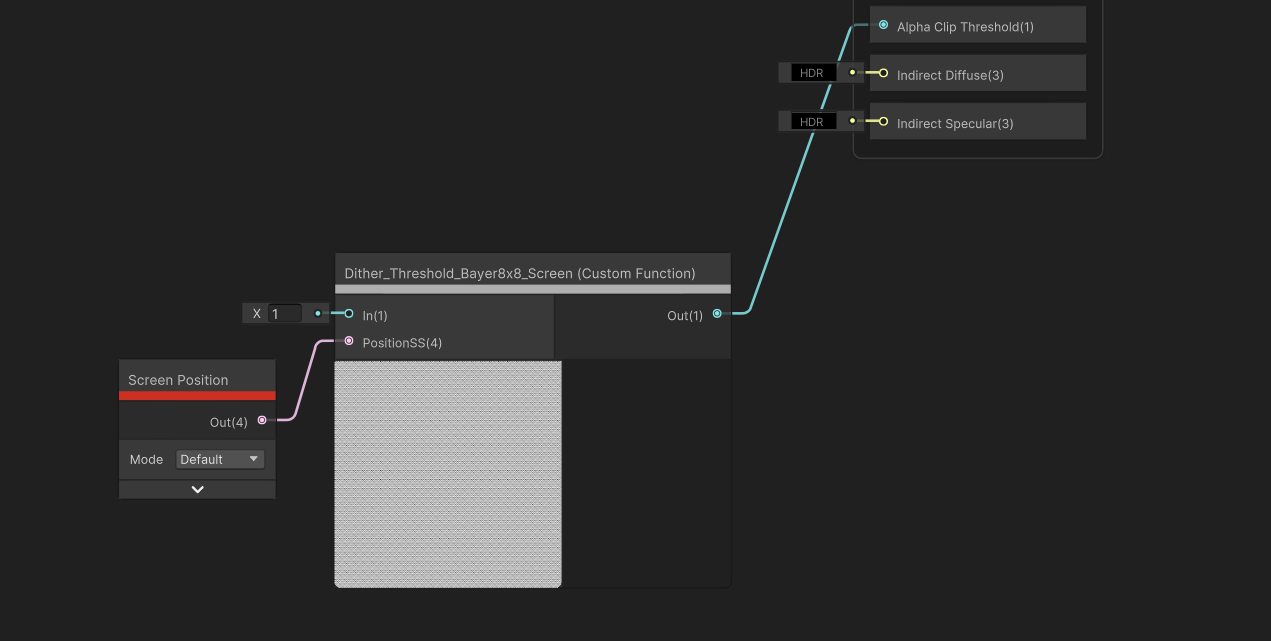
此时, 将inValue设为1, 然后输入ScreenPosition-Default连入, 输出节点连到Alpha Clip Threshold上, 并将材质球的Alpha Clipping打开, 调整Alpha值即可看到效果. 节点构成如下:
02 其他优化
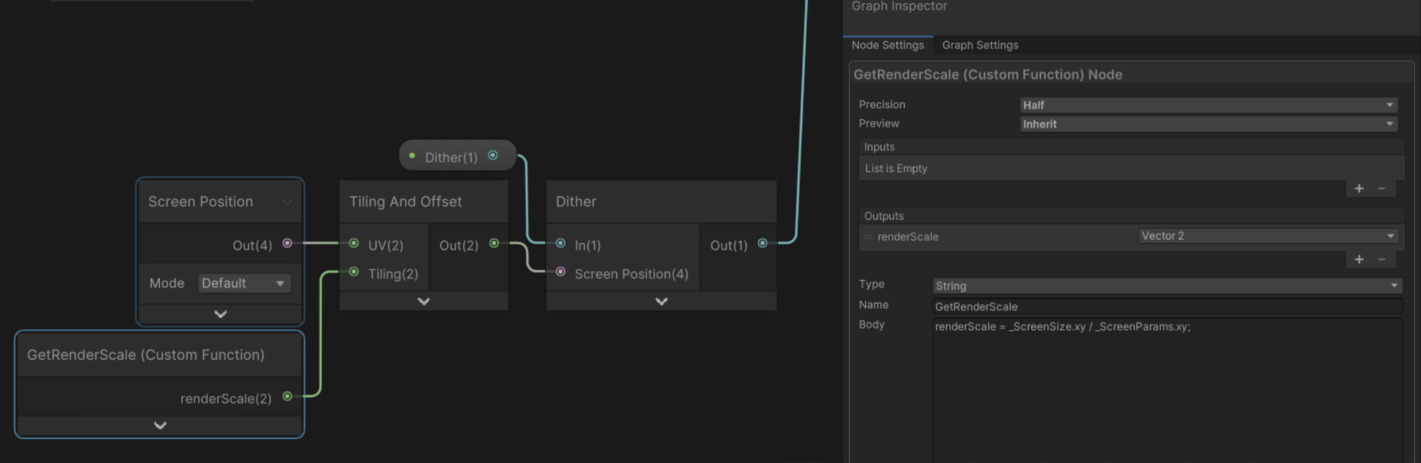
如果需要修改RenderScale还要保持Dither效果一致, 用以下方法.
参考网页
本文由作者按照 CC BY 4.0 进行授权