定制ShaderGraph(四)---Geometric Specular Anti-aliasing的URP实现
定制ShaderGraph(四)—Geometric Specular Anti-aliasing的URP实现
00 前置知识
Unity在HDRP中是自带这个算法及优化的.
可以在文件Library/PackageCache/com.unity.render-pipelines.high-definition@12.1.15/Runtime/Material/Lit/LitData.hlsl中找到如下代码(Unity6中, 这部分直接被合并到了CommonMaterial.hlsl):
1
2
3
4
5
6
7
8
#if defined(_ENABLE_GEOMETRIC_SPECULAR_AA) && !defined(SHADER_STAGE_RAY_TRACING)
    // Specular AA
    #ifdef PROJECTED_SPACE_NDF_FILTERING
    surfaceData.perceptualSmoothness = ProjectedSpaceGeometricNormalFiltering(surfaceData.perceptualSmoothness, input.tangentToWorld[2], _SpecularAAScreenSpaceVariance, _SpecularAAThreshold);
    #else
    surfaceData.perceptualSmoothness = GeometricNormalFiltering(surfaceData.perceptualSmoothness, input.tangentToWorld[2], _SpecularAAScreenSpaceVariance, _SpecularAAThreshold);
    #endif
#endif
点击函数名可以跳转到文件Library/PackageCache/com.unity.render-pipelines.core@12.1.15/ShaderLibrary/CommonMaterial.hlsl
注意, 该文件并不专属于HDRP, 而是属于com.unity.render-pipelines.core, 即在URP中, 可以直接调用.
1
2
3
4
5
6
7
8
9
10
11
12
13
14
15
16
17
18
19
20
21
22
23
24
25
// Reference: Error Reduction and Simplification for Shading Anti-Aliasing
// Specular antialiasing for geometry-induced normal (and NDF) variations: Tokuyoshi / Kaplanyan et al.'s method.
// This is the deferred approximation, which works reasonably well so we keep it for forward too for now.
// screenSpaceVariance should be at most 0.5^2 = 0.25, as that corresponds to considering
// a gaussian pixel reconstruction kernel with a standard deviation of 0.5 of a pixel, thus 2 sigma covering the whole pixel.
float GeometricNormalVariance(float3 geometricNormalWS, float screenSpaceVariance)
{
    float3 deltaU = ddx(geometricNormalWS);
    float3 deltaV = ddy(geometricNormalWS);

    return screenSpaceVariance * (dot(deltaU, deltaU) + dot(deltaV, deltaV));
}

// Return modified perceptualSmoothness
float GeometricNormalFiltering(float perceptualSmoothness, float3 geometricNormalWS, float screenSpaceVariance, float threshold)
{
    float variance = GeometricNormalVariance(geometricNormalWS, screenSpaceVariance);
    return NormalFiltering(perceptualSmoothness, variance, threshold);
}

float ProjectedSpaceGeometricNormalFiltering(float perceptualSmoothness, float3 geometricNormalWS, float screenSpaceVariance, float threshold)
{
    float variance = GeometricNormalVariance(geometricNormalWS, screenSpaceVariance);
    return ProjectedSpaceNormalFiltering(perceptualSmoothness, variance, threshold);
}
可以看到两个函数调用的都是GeometricNormalVariance这个函数(这个函数的算法到Unity6都没有更新过)
论文来源是テクノロジー推進部 ADVANCED TECHNOLOGY DIVISION | SQUARE ENIX
中的Error Reduction and Simplification for Shading Anti-Aliasing, 2017年的版本.
实际上, 在2019年, 同一组作者(Yusuke Tokuyoshi and Anton S. Kaplanyan)发布了Improved Geometric Specular Antialiasing, 更新的版本.
然后启用宏”PROJECTED_SPACE_NDF_FILTERING”后, 是利用的同一作者在2021年发布的Stable Geometric Specular Antialiasing with Projected-Space NDF Filtering.
这很古怪, 除非2021年论文中用的是2017年的variance算法, 否则这个算法就有问题.
本次计划先尝试还原HDRP的版本, 然后再将算法更新至2019年的版本.
另: 在这部分代码下面, 还能找到基于教团: 1886的NormalMapfilter的相关函数.
01 实施
首先, 我们需要需要在SurfaceData中添加一些参数, 用来承载数据传输.
在Library/PackageCache/com.unity.render-pipelines.high-definition@12.1.15/Runtime/Material/Lit/Lit.cs.hlsl中可以找到HDRP的SurfaceData
1
2
3
4
5
6
7
8
9
10
11
12
13
14
15
16
17
18
19
20
21
22
23
24
struct SurfaceData
{
    uint materialFeatures;
    real3 baseColor;
    real specularOcclusion;
    float3 normalWS;
    real perceptualSmoothness;
    real ambientOcclusion;
    real metallic;
    real coatMask;
    real3 specularColor;
    uint diffusionProfileHash;
    real subsurfaceMask;
    real thickness;
    float3 tangentWS;
    real anisotropy;
    real iridescenceThickness;
    real iridescenceMask;
    real3 geomNormalWS;
    real ior;
    real3 transmittanceColor;
    real atDistance;
    real transmittanceMask;
};
对比URP的Library/PackageCache/com.unity.render-pipelines.universal@12.1.10/ShaderLibrary/SurfaceData.hlsl
1
2
3
4
5
6
7
8
9
10
11
12
13
struct SurfaceData
{
    half3 albedo;
    half3 specular;
    half  metallic;
    half  smoothness;
    half3 normalTS;
    half3 emission;
    half  occlusion;
    half  alpha;
    half  clearCoatMask;
    half  clearCoatSmoothness;
};
不需要进行传递, 直接用SubGraph就可以完成
两个Filter算法的函数如下, 在文件Library/PackageCache/com.unity.render-pipelines.core@12.1.15/ShaderLibrary/CommonMaterial.hlsl中
1
2
3
4
5
6
7
8
9
10
11
12
13
14
15
16
17
18
19
20
21
// Return modified perceptualSmoothness based on provided variance (get from GeometricNormalVariance + TextureNormalVariance)
float NormalFiltering(float perceptualSmoothness, float variance, float threshold)
{
    float roughness = PerceptualSmoothnessToRoughness(perceptualSmoothness);
    // Ref: Geometry into Shading - http://graphics.pixar.com/library/BumpRoughness/paper.pdf - equation (3)
    float squaredRoughness = saturate(roughness * roughness + min(2.0 * variance, threshold * threshold)); // threshold can be really low, square the value for easier control

    return RoughnessToPerceptualSmoothness(sqrt(squaredRoughness));
}

float ProjectedSpaceNormalFiltering(float perceptualSmoothness, float variance, float threshold)
{
    float roughness = PerceptualSmoothnessToRoughness(perceptualSmoothness);
    // Ref: Stable Geometric Specular Antialiasing with Projected-Space NDF Filtering - https://yusuketokuyoshi.com/papers/2021/Tokuyoshi2021SAA.pdf
    float squaredRoughness = roughness * roughness;
    float projRoughness2 = squaredRoughness / (1.0 - squaredRoughness);
    float filteredProjRoughness2 = saturate(projRoughness2 + min(2.0 * variance, threshold * threshold));
    squaredRoughness = filteredProjRoughness2 / (filteredProjRoughness2 + 1.0f);

    return RoughnessToPerceptualSmoothness(sqrt(squaredRoughness));
}
- 将重复运算部分提取出来, 然后整理为ShaderGraph和通常都可兼容的hlsl文件, 内容如下:
1
2
3
4
5
6
7
8
9
10
11
12
13
14
15
16
17
18
19
20
21
22
23
24
25
26
27
28
29
30
31
32
33
34
35
36
37
38
39
40
41
42
43
44
45
46
47
48
49
50
51
52
53
54
55
56
57
58
59
60
61
62
63
64
65
66
67
68
69
70
71
72
73
74
75
76
77
78
79
80
81
82
83
84
85
86
87
88
89
90
91
92
93
94
95
96
97
98
99
100
101
102
103
104
105
106
107
108
109
110
111
112
113
114
#ifndef JAUVED_GEOMETRIC_SPECULARAA_INCLUDED
#define JAUVED_GEOMETRIC_SPECULARAA_INCLUDED

#ifndef SHADERGRAPH_PREVIEW
// 这里放非UnityShaderGraph自定的hlsl
#include  "Packages/com.unity.render-pipelines.core/ShaderLibrary/Common.hlsl"
#endif

#include "Packages/com.unity.render-pipelines.core/ShaderLibrary/CommonMaterial.hlsl"

// // Reference: Error Reduction and Simplification for Shading Anti-Aliasing
// // Specular antialiasing for geometry-induced normal (and NDF) variations: Tokuyoshi / Kaplanyan et al.'s method.
// // This is the deferred approximation, which works reasonably well so we keep it for forward too for now.
// // screenSpaceVariance should be at most 0.5^2 = 0.25, as that corresponds to considering
// // a gaussian pixel reconstruction kernel with a standard deviation of 0.5 of a pixel, thus 2 sigma covering the whole pixel.
// float GeometricNormalVariance(float3 geometricNormalWS, float screenSpaceVariance)
// {
//     float3 deltaU = ddx(geometricNormalWS);
//     float3 deltaV = ddy(geometricNormalWS);
//
//     return screenSpaceVariance * (dot(deltaU, deltaU) + dot(deltaV, deltaV));
// }

// Return modified perceptualSmoothness based on provided variance (get from GeometricNormalVariance + TextureNormalVariance)
float NormalFilteringRoughness(float roughness, float variance, float threshold)
{
    // float roughness = PerceptualSmoothnessToRoughness(perceptualSmoothness);
    // Ref: Geometry into Shading - http://graphics.pixar.com/library/BumpRoughness/paper.pdf - equation (3)
    float squaredRoughness = saturate(roughness * roughness + min(2.0 * variance, threshold * threshold));
    // threshold can be really low, square the value for easier control

    // return RoughnessToPerceptualSmoothness(sqrt(squaredRoughness));
    return sqrt(squaredRoughness);
}

float ProjectedSpaceNormalFilteringRoughness(float roughness, float variance, float threshold)
{
    // float roughness = PerceptualSmoothnessToRoughness(perceptualSmoothness);
    // Ref: Stable Geometric Specular Antialiasing with Projected-Space NDF Filtering - https://yusuketokuyoshi.com/papers/2021/Tokuyoshi2021SAA.pdf
    float squaredRoughness = roughness * roughness;
    float projRoughness2 = squaredRoughness / max(1.0 - squaredRoughness, FLT_MIN);
    float filteredProjRoughness2 = saturate(projRoughness2 + min(2.0 * variance, threshold * threshold));
    squaredRoughness = filteredProjRoughness2 / (filteredProjRoughness2 + 1.0f);

    // return RoughnessToPerceptualSmoothness(sqrt(squaredRoughness));
    return sqrt(squaredRoughness);
}

// Return modified perceptualSmoothness
float GeometricNormalFiltering(float roughness, float geometricNormalVariance, float threshold)
{
    // float variance = GeometricNormalVariance(geometricNormalWS, screenSpaceVariance);
    return NormalFilteringRoughness(roughness, geometricNormalVariance, threshold);
}

float ProjectedSpaceGeometricNormalFiltering(float roughness, float geometricNormalVariance, float threshold)
{
    // float variance = GeometricNormalVariance(geometricNormalWS, screenSpaceVariance);
    return ProjectedSpaceNormalFilteringRoughness(roughness, geometricNormalVariance, threshold);
}

// 调用伪代码, 取自Packages/com.unity.render-pipelines.high-definition/Runtime/Material/Lit/LitData.hlsl
// #if defined(_ENABLE_GEOMETRIC_SPECULAR_AA) && !defined(SHADER_STAGE_RAY_TRACING)
//     // Specular AA
//     #ifdef PROJECTED_SPACE_NDF_FILTERING
//     surfaceData.perceptualSmoothness = ProjectedSpaceGeometricNormalFiltering(surfaceData.perceptualSmoothness, input.tangentToWorld[2], _SpecularAAScreenSpaceVariance, _SpecularAAThreshold);
//     #else
//     surfaceData.perceptualSmoothness = GeometricNormalFiltering(surfaceData.perceptualSmoothness, input.tangentToWorld[2], _SpecularAAScreenSpaceVariance, _SpecularAAThreshold);
//     #endif
// #endif

void GeometricSpecularAAPerceptualSmoothness_float(float perceptualSmoothness, float3 geometricNormalWS,
                                                   float screenSpaceVariance, float threshold,
                                                   bool geometricSpecularAAOn, bool projectedSpaceNDFFiltering,
                                                   out float smoothness)
{
    // 静态分支, 因为完全可以确定是走哪个分支
    UNITY_BRANCH
    if (geometricSpecularAAOn)
    {
        float geometricSpecularAARoughness;
        float geometricNormalVariance = GeometricNormalVariance(geometricNormalWS, screenSpaceVariance);
        float roughness = PerceptualSmoothnessToRoughness(perceptualSmoothness);
        // 静态分支, 因为完全可以确定是走哪个分支
        UNITY_BRANCH
        if (projectedSpaceNDFFiltering)
        {
            geometricSpecularAARoughness = ProjectedSpaceGeometricNormalFiltering(
                roughness, geometricNormalVariance, threshold);
        }
        else
        {
            geometricSpecularAARoughness = GeometricNormalFiltering(roughness, geometricNormalVariance, threshold);
        }
        smoothness = RoughnessToPerceptualSmoothness(geometricSpecularAARoughness);
    }
    else
    {
        smoothness = perceptualSmoothness;
    }
}

void GeometricSpecularAAPerceptualSmoothness_half(half perceptualSmoothness, half3 geometricNormalWS,
                                                   half screenSpaceVariance, half threshold,
                                                   bool geometricSpecularAAOn, bool projectedSpaceNDFFiltering,
                                                   out half smoothness)
{
    GeometricSpecularAAPerceptualSmoothness_float(perceptualSmoothness,geometricNormalWS,
        screenSpaceVariance,threshold,geometricSpecularAAOn,projectedSpaceNDFFiltering,smoothness);
}


#endif
其中涉及到UNITY_FLATTEN和UNITY_BRANCH两个宏.
UNITY_FLATTEN
当你的两条分支的计算都非常简单的时候, 就不要走真正的分支, 而是两边都计算, 然后通过条件来取结果. 适用于一次渲染产生不同结果的情况.
UNITY_BRANCH
当你的两条分支中, 其中一条/两条比较昂贵(比如运输量特别大, 或者涉及到贴图采样), 但你又非常确定在一次渲染中只会走其中一条分支的时候, 采用这个宏, 代价是大概12条运算指令.
当一次渲染产生不同的结果, 同时其中一条/多条比较昂贵的时候, 请避免这种情况的发生.
详情参见流控制 - Win32 apps | Microsoft Learn
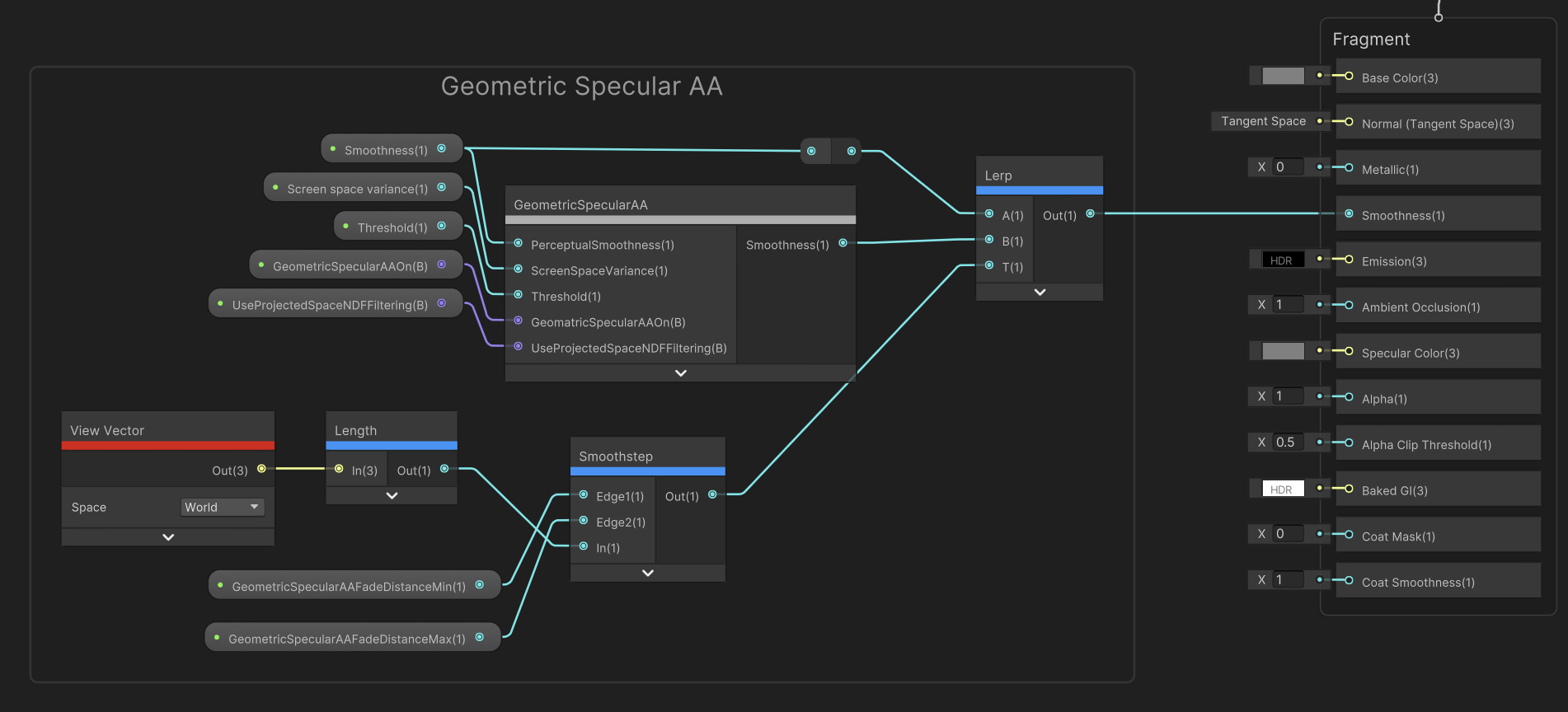
以自定义节点的方式接入ShaderGraph, 并加入随视线距离变化而还原正常的Smoothness的功能, 这样, 在极近距离则可以完全的体现硬表面建模的细节. 代价是当GeometricSpecularAA生效时环境贴图会达不到最高的精度, 但HDRP同样会有该缺陷.