UModel逆向拆解流程
UModel逆向拆解流程
UModel逆向拆解流程
00 步骤
- 软件准备
找到游戏Paks所在的目录类似
...\Project\Content\Paks使用UModel进行预览并导出psk文件
- 如果能确认UE版本最好, 无法确认的情况下只能尝试
- 如果对方使用了比较新的UE版本, 则可能需要使用对应的UE中的SDK重新构建UModel
- UModel源码工程中
libs/oodle中的ReadMe读一下, 会直到从哪里获得oodle的SDK
- UModel源码工程中
- SMTVV对应的版本是4.26/4.27, 且需要关闭动画导出, 可以导出蒙皮文件.
进入Blender, 按照以下步骤安装psk导入插件
For Blender 4.2 and higher, it is recommended to download the latest version from the Blender Extensions platform.
For Blender 4.1 and lower, you can install the addon manually by following these steps:
- Download the .zip file of the latest compatible version for your Blender version (see Legacy Compatibility).
- Open Blender.
- Navigate to the Blender Preferences (
Edit>Preferences). - Select the
Add-onstab. - Click the
Install...button. - Select the .zip file that you downloaded earlier and click
Install Add-on. - Enable the newly added
Import-Export: PSK/PSA Importer/Exporteraddon.
导入psk文件后, 将父物体的缩放调整为0.01, 然后应用变换
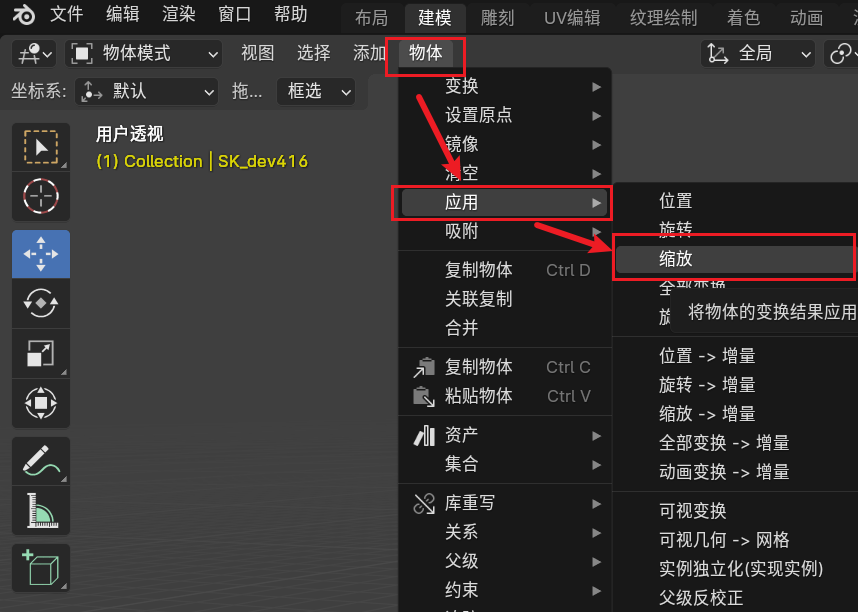
- 此时可以导入Unity并正常使用
参考网页
一次提取虚幻引擎游戏素材并导入Blender的过程及问题记录 - 哔哩哔哩 (bilibili.com)
UModel源码: gildor2/UEViewer: Viewer and exporter for Unreal Engine 1-4 assets (UE Viewer). (github.com)
o_scene_psk_psa源码: Releases · DarklightGames/io_scene_psk_psa (github.com)
本文由作者按照 CC BY 4.0 进行授权