Unity 基于Shader Compiler的Crash问题
Unity 基于Shader Compiler的Crash问题
00 Crash发生环境
- 系统信息
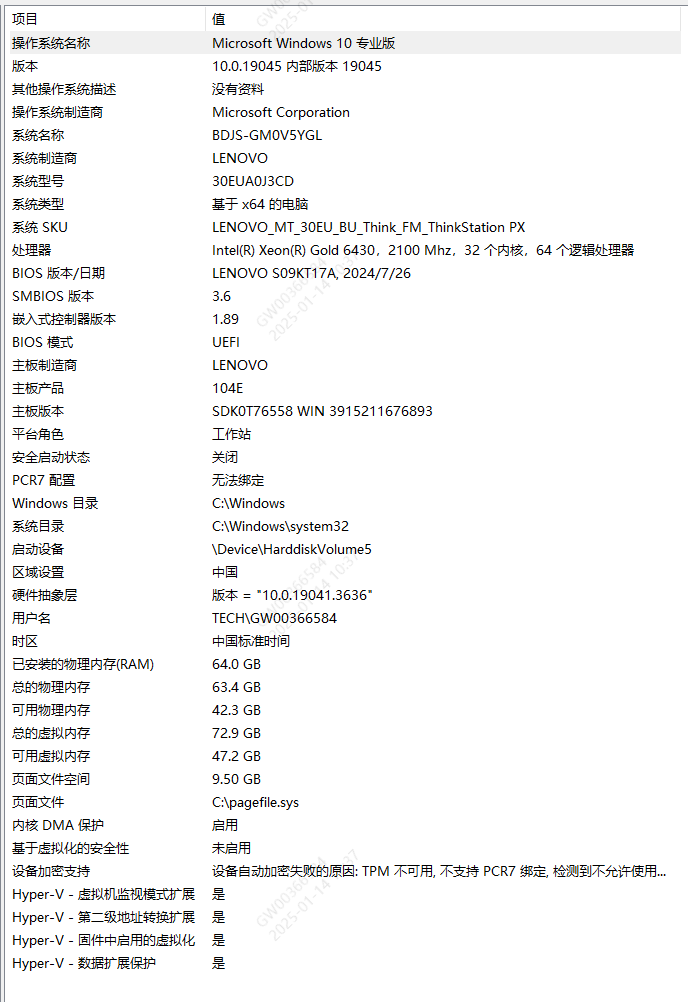
- UnityHub版本: 3.10
- Unity版本: 2021.3.21f1
01 问题表征
在选择对象时, 花费大量时间去绘制对象的Inspector面板.
多个工程打开时, 后打开的Unity会随机Crash.
查看Unity编辑器崩溃日志时有类似内容(关键词: ipc connection, UnityShaderCompiler, 0x80000008, Timed out)
- Unity编辑器崩溃日志路径(其中XXXXXXX是个人的用户名): C:\Users\XXXXXXX\AppData\Local\Temp\Unity\Editor\Crashes
1
2
3
4
5
6
7
8
9
10
11
12
13
14
15
16
17
18
19
20
21
22
23
Launched and connected shader compiler UnityShaderCompiler.exe after 2.48 seconds
Failed to get ipc connection from UnityShaderCompiler.exe shader compiler! Error code 0x80000008 (Timed out). D:/Program Files/Unity/Hub/Editor/2021.3.45f1/Editor/Data/Tools/UnityShaderCompiler.exe
Failed to get ipc connection from UnityShaderCompiler.exe shader compiler! Error code 0x80000008 (Timed out). D:/Program Files/Unity/Hub/Editor/2021.3.45f1/Editor/Data/Tools/UnityShaderCompiler.exe
Launched and connected shader compiler UnityShaderCompiler.exe after 2.32 seconds
Launched and connected shader compiler UnityShaderCompiler.exe after 14.40 seconds
Failed to get ipc connection from UnityShaderCompiler.exe shader compiler! Error code 0x80000008 (Timed out). D:/Program Files/Unity/Hub/Editor/2021.3.45f1/Editor/Data/Tools/UnityShaderCompiler.exe
Failed to get ipc connection from UnityShaderCompiler.exe shader compiler! Error code 0x80000008 (Timed out). D:/Program Files/Unity/Hub/Editor/2021.3.45f1/Editor/Data/Tools/UnityShaderCompiler.exe
Failed to get ipc connection from UnityShaderCompiler.exe shader compiler! Error code 0x80000008 (Timed out). D:/Program Files/Unity/Hub/Editor/2021.3.45f1/Editor/Data/Tools/UnityShaderCompiler.exe
Failed to get ipc connection from UnityShaderCompiler.exe shader compiler! Error code 0x80000008 (Timed out). D:/Program Files/Unity/Hub/Editor/2021.3.45f1/Editor/Data/Tools/UnityShaderCompiler.exe
Launched and connected shader compiler UnityShaderCompiler.exe after 2.73 seconds
Failed to get ipc connection from UnityShaderCompiler.exe shader compiler! Error code 0x80000008 (Timed out). D:/Program Files/Unity/Hub/Editor/2021.3.45f1/Editor/Data/Tools/UnityShaderCompiler.exe
Failed to get ipc connection from UnityShaderCompiler.exe shader compiler! Error code 0x80000008 (Timed out). D:/Program Files/Unity/Hub/Editor/2021.3.45f1/Editor/Data/Tools/UnityShaderCompiler.exe
Failed to get ipc connection from UnityShaderCompiler.exe shader compiler! Error code 0x80000008 (Timed out). D:/Program Files/Unity/Hub/Editor/2021.3.45f1/Editor/Data/Tools/UnityShaderCompiler.exe
Failed to get ipc connection from UnityShaderCompiler.exe shader compiler! Error code 0x80000008 (Timed out). D:/Program Files/Unity/Hub/Editor/2021.3.45f1/Editor/Data/Tools/UnityShaderCompiler.exe
Failed to get ipc connection from UnityShaderCompiler.exe shader compiler! Error code 0x80000008 (Timed out). D:/Program Files/Unity/Hub/Editor/2021.3.45f1/Editor/Data/Tools/UnityShaderCompiler.exe
Failed to get ipc connection from UnityShaderCompiler.exe shader compiler! Error code 0x80000008 (Timed out). D:/Program Files/Unity/Hub/Editor/2021.3.45f1/Editor/Data/Tools/UnityShaderCompiler.exe
Failed to get ipc connection from UnityShaderCompiler.exe shader compiler! Error code 0x80000008 (Timed out). D:/Program Files/Unity/Hub/Editor/2021.3.45f1/Editor/Data/Tools/UnityShaderCompiler.exe
Failed to get ipc connection from UnityShaderCompiler.exe shader compiler! Error code 0x80000008 (Timed out). D:/Program Files/Unity/Hub/Editor/2021.3.45f1/Editor/Data/Tools/UnityShaderCompiler.exe
Failed to get ipc connection from UnityShaderCompiler.exe shader compiler! Error code 0x80000008 (Timed out). D:/Program Files/Unity/Hub/Editor/2021.3.45f1/Editor/Data/Tools/UnityShaderCompiler.exe
Failed to get ipc connection from UnityShaderCompiler.exe shader compiler! Error code 0x80000008 (Timed out). D:/Program Files/Unity/Hub/Editor/2021.3.45f1/Editor/Data/Tools/UnityShaderCompiler.exe
Shader compiler: failed to launch and initialize compiler executable, even after 10 retries
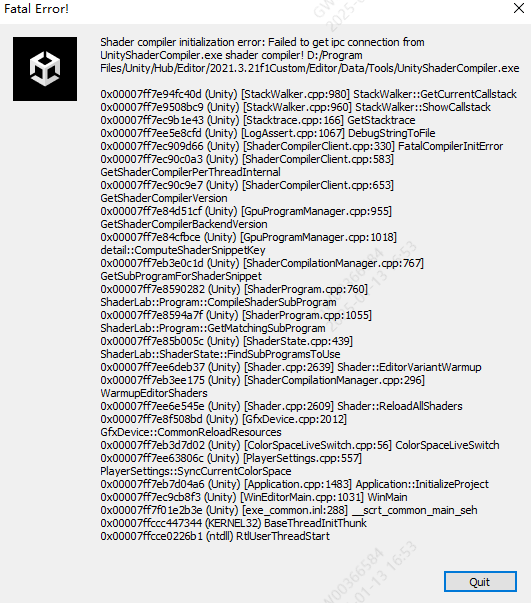
Shader compiler initialization error: Failed to get ipc connection from UnityShaderCompiler.exe shader compiler! Error code 0x80000008 (Timed out). D:/Program Files/Unity/Hub/Editor/2021.3.45f1/Editor/Data/Tools/UnityShaderCompiler.exe
Cancelling DisplayDialog because it was run from a thread that is not the main thread: Fatal Error! Shader compiler initialization error: Failed to get ipc connection from UnityShaderCompiler.exe shader compiler! Error code 0x80000008 (Timed out). D:/Program Files/Unity/Hub/Editor/2021.3.45f1/Editor/Data/Tools/UnityShaderCompiler.exe
工程崩溃时弹出以下报错框
02 临时解决方案
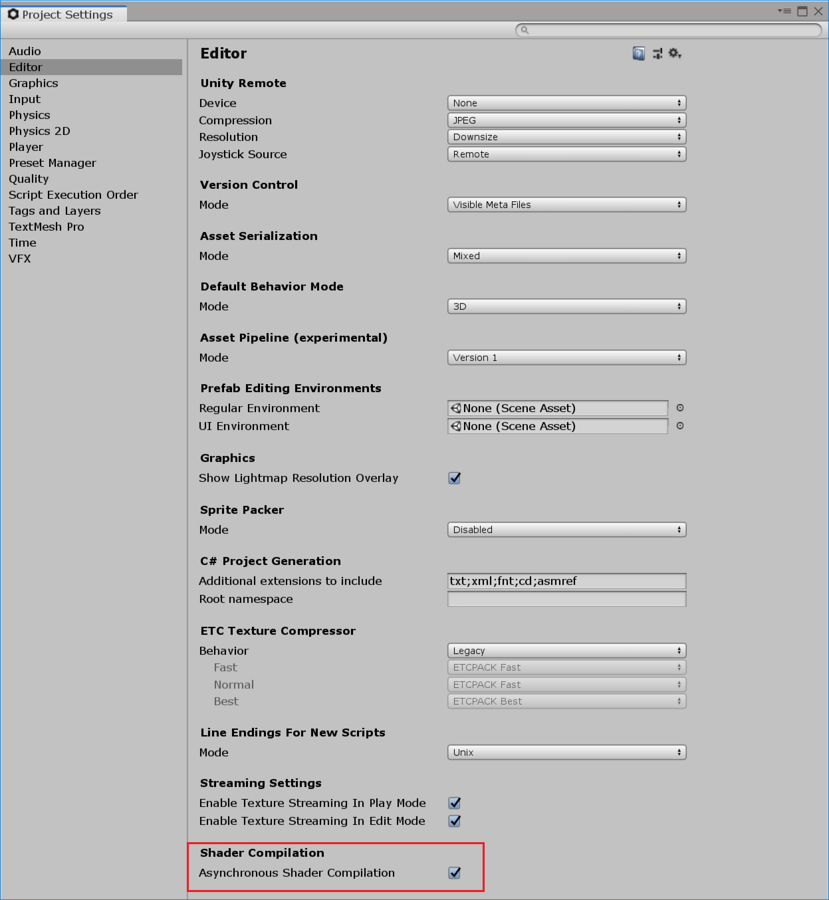
关闭Unity异步编译(不推荐)
优点: 无需管理员权限, 无系统影响
缺点: 着色器编译慢, 如果你每次进入Unity都崩溃, 则无法通过菜单栏操作, 需要直接修改配置文件
步骤
在Unity编辑器中进入菜单栏Edit > Project Settings > Editor, 在编辑器设置底部的 Shader Compilation 下,取消选中 Asynchronous Shader Compilation 复选框。
相关页面
修改Windows系统的桌面堆内存上限(推荐但不一定有效)
- 优点: 不仅可以解决Unity卡顿的问题, 还可以解决其他应用因为异步多线程导致的Crash和卡顿
- 缺点: 需要修改注册表, 需要管理员权限, 可能对系统运行有未知的其他影响
- 步骤
- open Regedit
- go to “HKLM\SYSTEM\CurrentControlSet\Control\Session Manager\SubSystems”
- double-click “Windows”
- change the 768 number in the “SharedSection=1024,20480,768” part to 2048
- restart Windows
- 相关页面
修改Unity可以启用的线程数(未验证)
优点: 无需管理员权限, 仍旧可以使用多线程编译着色器
缺点: 只解决Unity某个版本编辑器的问题, 如需多个编辑器都采用, 则需要多次操作
步骤
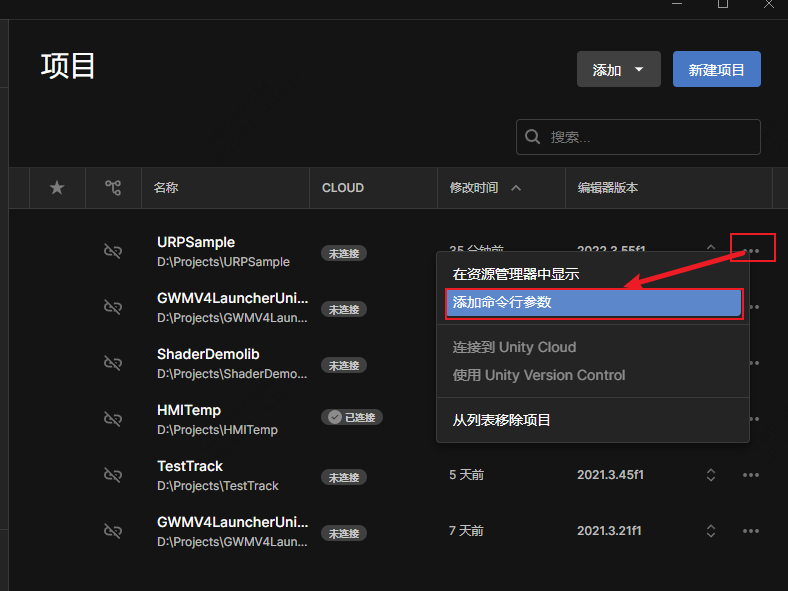
在UnityHub中开启编辑器启动命令行参数页面
添加参数
1
-job-worker-count <N>
其中<N>表示你设定的线程数, 通常来说, 8是比较合适的值(截止2025年1月), 具体的值请根据实际情况酌情调整
相关页面
03 情况比想象中要复杂
新的这部分原因推理, 归类到原因二.
首先Windows对于大小核调度就是有问题的. 最严重的情况就是崩溃黑屏和无法启动.
这里是发生崩溃的电脑CPU(英特尔® 至强® Gold 6430 处理器)制式的官方资料.
另一台没有问题的电脑CPU(Intel® Core™ Ultra 9 Processor 275HX)制式的官方资料.
可以看到, 没有问题的电脑的核心频率比问题电脑的核心频率高了太多. 不排除IPC通信困难一直都存在, 只是因为如果处理得快, 那么发生的几率就低.
关于如何控制Windows开启大小核调度, 搜索”Windows”, “大小核调度”, 可以找到相关的文章.
04 可能原因分析
注: 以下结论没有严格的验证, 仅仅是收集的信息和目前有效的解决方案的逻辑反推.
原因一
- Unity在着色器编译时, 默认开启异步编译(事实), 并且会调用空闲的尽可能多的线程(推论)
- 可开辟的线程数与CPU本身的制式相关(事实)
- Windows10的专业版, 为桌面堆内存上限设定的是512KB”SharedSection=1024,20480,512”(事实)
- 而当你使用的CPU核数过多, 且能开辟的线程数量所调用的桌面堆内存超过上限, 就会因为堆内存不足从而最终导致崩溃(推论)
- Intel(R) Xeon(R) Gold 6430 2.10 GHz是32核, 两块则为64核(事实)
- 超高的核数导致编译着色器线程过多, 最终引发了堆内存崩溃(结论)
原因二
- IPC通信困难原因未知
- 线程多, 是因为Unity默认每一个核开辟一个线程, 事实上最好的方式是”每一个大核开辟一个线程”
- CPU核心频率低, 因为是服务器类型的电脑, 核心多而频率低
- IPC通信困难(事实)+线程多(事实)+CPU核心频率低(事实), 从而导致程序一直等待, 直到崩溃.
05 检测工具
UnityShaderCompiler与RiderMsBuild线程卡死
收集信息
- Unity日志: %USERPROFILE%\AppData\Local\Unity\Editor\Editor.log
- Rider日志: Help -> Show Log in Explorer
- 使用ProcessExplorer (也可以直接安装Sysinternals 实用工具 - Sysinternals | Microsoft Learn)
- 在 Windows 中打开 事件查看器(Event Viewer) -> Windows Logs -> Application,查看是否有相关的错误条目.